
The User Portal and the Knowledge Base are two complementary features within Help Desk software: the portal gives users a single point of access to support, while the knowledge base lets them find answers before submitting a request.
- Why do companies need a Self-Service Portal?
- Features of ServiceTonic’s Self-Service Portal
- Comparison between a traditional portal and ServiceTonic’s Self-Service Portal
- How to implement a Self-Service Portal in a company?
- Frequently Asked Questions about Self-Service Portals and Knowledge Management
- Conclusion
In ServiceTonic, the Self-Service Portal is integrated with the service management environment. Each user can access the information and the service catalog available for their profile and, when they need additional help, submit a request that is centralized in the Help Desk software.
The portal can also connect with ServiceTonic’s AI Agents, which use the knowledge sources defined by the company to answer questions and find relevant information. In this way, the Self-Service Portal and Knowledge Management work together with the AI Agents and ticket management to resolve more inquiries before they reach the support team.
How a Self-Service Portal helps resolve inquiries without opening tickets
A Self-Service Portal isn’t just for submitting requests. It also lets users find answers on their own before turning to the support team, reducing the number of tickets agents receive.
With ServiceTonic’s Self-Service Portal, users have two main ways to resolve their most common questions using different knowledge management tools. They can search the Knowledge Base built into the portal, or interact with one or more AI Agents. These agents are configured by the company and connected to the knowledge sources defined for each service, which can include the Knowledge Base itself.
He dividido la última frase porque en inglés resultaba demasiado larga. Aquí he puesto “knowledge management tools” en minúscula porque en el original va en minúscula, a diferencia de “Gestión del Conocimiento” en el bloque anterior.
Knowledge Management to resolve common questions
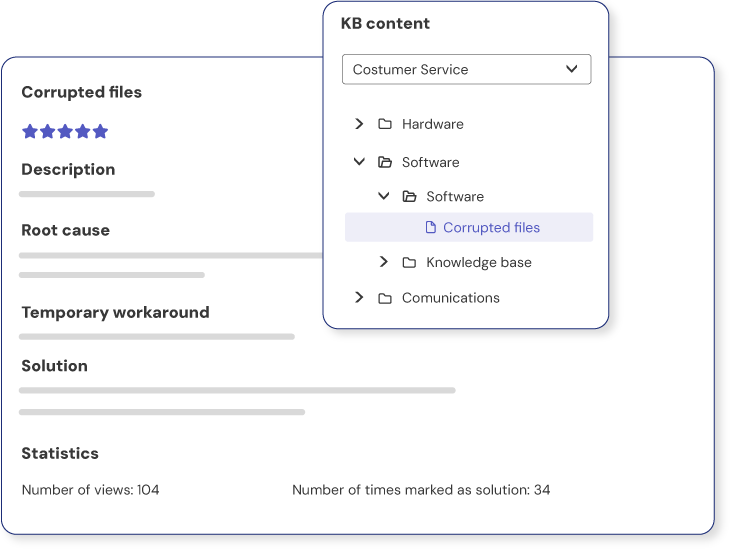
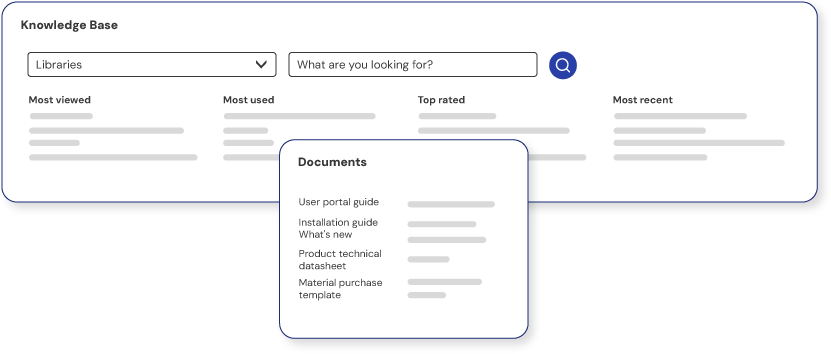
The Self-Service Portal’s Knowledge Base lets users browse articles with answers to frequently asked questions, procedures, how-to instructions and other useful information to resolve questions on their own. This content can include attached documentation and be configured by role, service or other criteria, so that each user only sees the information relevant to their profile.
From the Self-Service Portal, users can search this Knowledge Base and find solutions before opening a ticket. This helps resolve recurring questions, follow step-by-step procedures and reduce the number of requests that reach the support team.
AI Agents to find answers conversationally
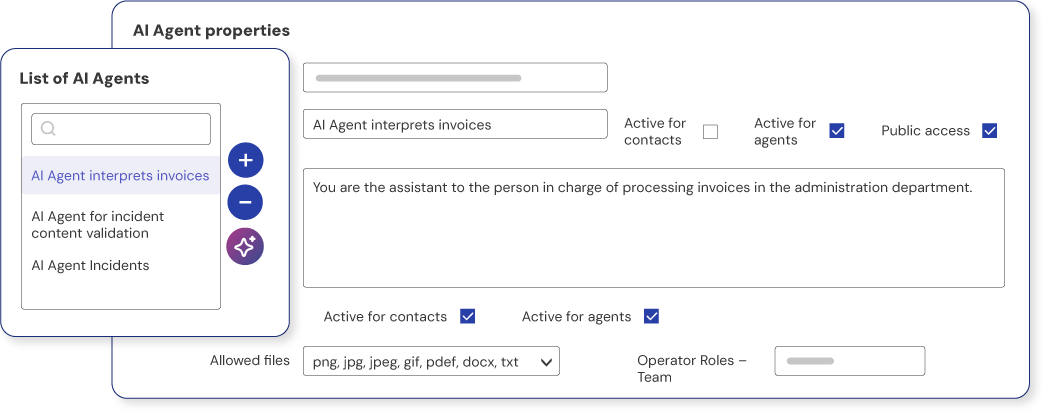
ServiceTonic’s AI Agents give users more direct access to knowledge. Instead of having to find the right article manually, users can ask a question and receive an answer based on the information sources configured by the company.
Among other sources, AI Agents can use the Knowledge Base, internal documentation, ticket history, company URLs or information from SharePoint.
This way, users can get answers conversationally and resolve certain inquiries without submitting a new request to the support team.
If the AI Agent can’t resolve the inquiry, the user can automatically create a ticket directly from the conversation. In that case, the ticket includes the history of the conversation with the AI Agent, so the support agent can see what the user asked and what answers they received, and has more context from the start to handle the request.
What happens when self-service isn’t enough
There will be times when users can’t find the answer in the Knowledge Base or the AI Agent can’t resolve their inquiry. At that point, they can open a support ticket so that a support agent can step in.
If the user has only searched the Knowledge Base, the ticket will contain the information they enter when submitting the request. However, if the inquiry was handled conversationally with an AI Agent, the support agent will be able to access the conversation history: what the user asked, what answers they received and where they got stuck.
This context makes it easier to handle the ticket and also helps identify what information is missing or needs to be improved in the knowledge sources. In this way, documentation can be gradually enriched to resolve more and more inquiries through self-service and reduce the volume of tickets that reach the support team.
Self-service therefore acts as a first line for resolving inquiries immediately, while access to the support team always remains available when needed.
How do the User Portal and the Knowledge Base work together in a Help Desk?
In a Help Desk, the User Portal acts as the access point to support, while the Knowledge Base provides the information needed to encourage self-service. The two features work together: users can search for a solution, browse documentation or ask an AI Agent and, if they don’t find an answer, submit a request directly from the portal.
In ServiceTonic, the User Portal brings together access to knowledge, ticket tracking, the service catalog and artificial intelligence in a single environment.
How does ServiceTonic integrate knowledge into the Self-Service Portal?
ServiceTonic’s Self-Service Portal brings together, in a single environment, access to knowledge, the services available to each user, AI Agents and the option to open a ticket when an inquiry can’t be resolved independently.
The portal thus acts as a single point of access. It first helps users find an answer or meet their needs through self-service and, when that isn’t enough, lets them contact the right support service.
Access to knowledge and the Service Catalog
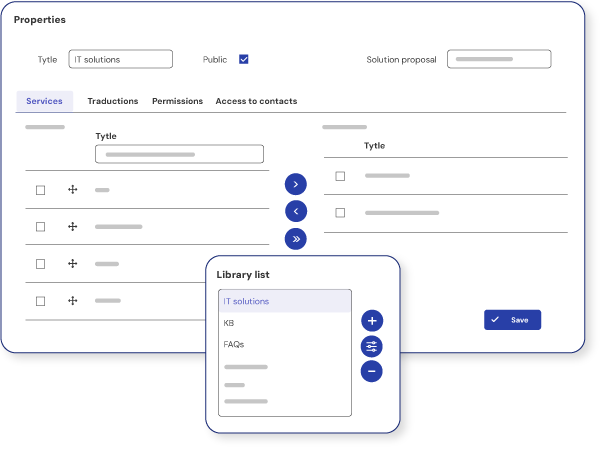
When users access ServiceTonic’s Self-Service Portal, they typically have one of two main needs. On the one hand, they may have an inquiry they can resolve through the Knowledge Base or the AI Agents. On the other, they may want to request one of the services the company offers, in which case they can access the Service Catalog available for their profile and submit the corresponding request.
In this way, the portal resolves many inquiries without the need to open a ticket and, when users need to request a service, routes the request through specific forms that capture the information needed to handle it from the start.
Both content and services can be displayed based on profile, department, permissions or other criteria defined by the organization, so each user can quickly find the options they actually need.
What inquiries can be resolved without opening a ticket
Not every user need requires a support agent to step in. Many inquiries can be resolved from the Self-Service Portal through the Knowledge Base or the AI Agents, especially when they involve known information, established procedures or recurring incidents.
Some examples are:
- Common incidents: access problems, application settings, known errors or frequent questions about using a tool.
- Internal procedures: instructions for carrying out an administrative task, requesting permissions, following a company process or completing a specific task.
- Questions about services: information about which services the company offers, how to request them, what their requirements are or who they’re intended for.
- Inquiries from different departments: questions related to IT, Human Resources, Facilities or customer service, provided the information is available in the relevant knowledge sources.
In these cases, users can find the answer directly in the Knowledge Base or ask an AI Agent, avoiding an unnecessary ticket. When the request requires action from the support team or there isn’t enough information to resolve it, users can continue the process by submitting a request directly from the portal.
How to manage knowledge so that self-service reduces tickets
For a Self-Service Portal to effectively reduce ticket volume, the information available must evolve based on real user inquiries. Knowledge management makes it possible to identify recurring questions, turn solutions into reusable content and gradually improve the answers available in the Knowledge Base and the AI Agents.
Within a service management system like ServiceTonic, this process can be approached as a continuous cycle:
- Identify the most frequent inquiries: analyzing tickets helps identify recurring incidents, questions and requests that could be resolved through self-service.
- Turn solutions into knowledge: support agents’ answers can be turned into articles, procedures or documentation that will then be available to other users.
- Use that knowledge in self-service tools: the information can be searched directly in the Knowledge Base and also used as a source for the AI Agents, helping users find an answer either in the traditional way or conversationally.
- Analyze inquiries that still end up as tickets: when a user can’t find a solution or the AI Agent can’t answer, that inquiry reveals what information is missing, insufficient or needs updating.
- Improve knowledge sources: adding new answers and reviewing existing content gradually increases the portal’s ability to resolve inquiries without support agents having to step in.
In this way, the management system is continuously fed by user inquiries: tickets help generate knowledge, knowledge improves self-service tools, and more complete self-service reduces the creation of new repetitive tickets.
Self-Service Portal use cases: example inquiries
A Self-Service Portal like ServiceTonic’s can be adapted to different departments and processes across the organization and integrated into service management software. In each case, it brings together access to knowledge, AI Agent queries and service requests in a single environment.
IT department
In IT, many recurring inquiries can be resolved through self-service without the need to open a ticket. For example:
- “How do I reset my password?”
- “How do I set up the VPN?”
- “How do I request access to an application?”
- “What software can I install?”
- “What should I do if an application isn’t working properly?”
Users can check technical documentation or ask these questions to an AI Agent. If they need the IT team to take action, they can continue the process by reporting an incident or requesting the corresponding service.
Human Resources
The Self-Service Portal lets employees find answers to many common inquiries without contacting Human Resources directly.
For example:
- “How do I request vacation time?”
- “What types of leave am I entitled to?”
- “How do I request a certificate?”
- “Where can I find internal policies?”
- “What documents do I need for a specific procedure?”
When an inquiry requires a specific action, the user can access the corresponding service from the portal and submit the request.
Sales department
The sales team can independently access the knowledge it needs for its day-to-day work. Some common inquiries might be:
- “What is the current price for this product?”
- “What documentation can I send to a customer?”
- “What promotions are currently available?”
- “Where can I find the latest version of a sales presentation?”
- “What is the procedure for requesting a special offer?”
The Knowledge Base and the AI Agents provide access to up-to-date information and reduce repetitive inquiries to other departments.
Finance
In Finance, self-service can resolve questions related to administrative and financial processes, such as:
- “How do I submit an expense?”
- “What documents do I need to request a reimbursement?”
- “What is the procedure for adding a new supplier?”
- “Where can I view an invoice?”
- “What information do I need to provide for a specific procedure?”
If the inquiry requires action from the department, the user can submit the request from the same portal using the corresponding form.
Facilities and General Services
Employees can also use the Self-Service Portal to resolve questions related to facilities and internal services. For example:
- “How do I book a meeting room?”
- “Where do I report a fault?”
- “How do I request new supplies?”
- “What should I do if I need equipment for my workstation?”
- “Who is responsible for handling a facilities issue?”
When intervention is needed, the user can submit the corresponding request and route it to the responsible team.
Customer Service
In customer service, self-service turns company knowledge into instant answers, resolving many inquiries without customers having to contact a customer service agent.
- “How do I set up the product?”
- “Where can I find the manual?”
- “How do I complete a specific process?”
- “What should I do about a known error?”
- “Where can I check the terms of a service?”
AI Agents can answer these questions conversationally using the knowledge sources authorized by the company. If the inquiry requires personalized attention, the customer can submit a request and continue the process with the support team.
Self-Service Portal FAQs
How does a Self-Service Portal help reduce tickets?
A Self-Service Portal lets users resolve many inquiries before contacting the support team. They can find answers in the Knowledge Base, look up procedures or interact with AI Agents, avoiding the need to open tickets for common questions or incidents that are already documented.
What’s the difference between searching the Knowledge Base and asking an AI Agent?
The Knowledge Base lets users search and browse articles, procedures or documentation directly. An AI Agent, on the other hand, lets users ask a question in natural language and receive an answer based on the knowledge sources configured by the company, which can include the Knowledge Base itself.
What happens if the AI Agent can’t resolve the inquiry?
If the AI Agent can’t provide a solution, the user can create a ticket so that a support agent can step in. In that case, the ticket can keep the conversation history, so the support team can see what the user asked, what answers they received and where they got stuck.
How does knowledge management help reduce repetitive tickets?
Knowledge management makes it possible to identify recurring inquiries, turn support agents’ solutions into reusable content and continuously improve the sources used by the Knowledge Base and the AI Agents. As a result, more and more users can resolve their questions through self-service, and fewer repetitive tickets reach the support team.
How does a Self-Service Portal improve the request management process?
A Self-Service Portal improves the management process because it resolves many inquiries before they reach the support team. When a ticket does need to be opened, the request can arrive with the information needed to handle it, making it easier to categorize, assign and resolve.
What are the benefits of a Self-Service Portal for businesses?
A Self-Service Portal helps businesses reduce repetitive tickets, speed up support and make better use of the knowledge generated by their teams. It also lets employees or customers find answers on their own through the Knowledge Base or the AI Agents, reducing their reliance on direct support.
How does knowledge management help improve a company’s management processes?
Knowledge management turns support agents’ solutions and expertise into reusable information. By adding that knowledge to the Knowledge Base and the AI Agents’ sources, the company can resolve more inquiries through self-service, reduce repetitive tasks and continuously improve its management processes.
Conclusion
A Self-Service Portal combined with good knowledge management turns an organization’s information into accessible answers for employees and customers. Through the Knowledge Base and the AI Agents, users can resolve many inquiries on their own before turning to the support team.
Integrating these management tools into the same environment reduces repetitive tickets, delivers faster answers and makes better use of the knowledge generated by support agents. In addition, inquiries that can’t be resolved through self-service help identify information that is missing or needs updating, feeding a process of continuous improvement.
In this way, knowledge management and the Self-Service Portal complement each other to increase user autonomy, reduce the workload of support teams and gradually improve service quality.
If you’d like to see how this model works in a service management platform, discover the ServiceTonic User Portal.