
A Service Desk is a tool that acts as a single point of contact between internal users or customers and the teams in charge of providing support, such as the IT department or Customer Service. Its goal is to channel and manage requests effectively.
The Service Desk as a solution for support teams
A Service Desk software is a strong solution for the end-to-end management of your company’s services — IT services, Human Resources, Customer Service, and other areas alike.
Unlike a ticketing tool or Help Desk software, it doesn’t just log and resolve incidents — it goes further and manages your company’s services as a whole.
Service management means overseeing the entire lifecycle of a service: defining it, maintaining it, measuring its quality, granting role-based access to agents, agreeing on SLAs, automating processes, and more — all with the goal of streamlining work for agents and improving the experience for end users.
What are the main functions of a Service Desk?
For a Service Desk to manage company services effectively, it needs to include several core functions:
- Centralized handling of user-submitted requests and incidents.
- Classification and assignment of tickets to the responsible team.
- Service request management — handling user account creation, password recovery, equipment requests, software requests, and more.
- SLA management.
- Oversight of problem solving and resolution.
- Problem management and documentation.
- Monitoring and reporting.
- Escalation and coordination of tickets to other departments or owners with zero loss of information.
With these functions, a Service Desk like ServiceTonic doesn’t just resolve incidents — it manages and coordinates your company’s services.
What benefits does it bring to companies?
This type of solution delivers significant benefits to any organization:
- Improves request and service management.
- Reduces problem resolution times.
- Boosts operational efficiency.
- Raises the quality of problem solving and resolution.
- Enables thorough control over requests.
- Improves the customer experience.
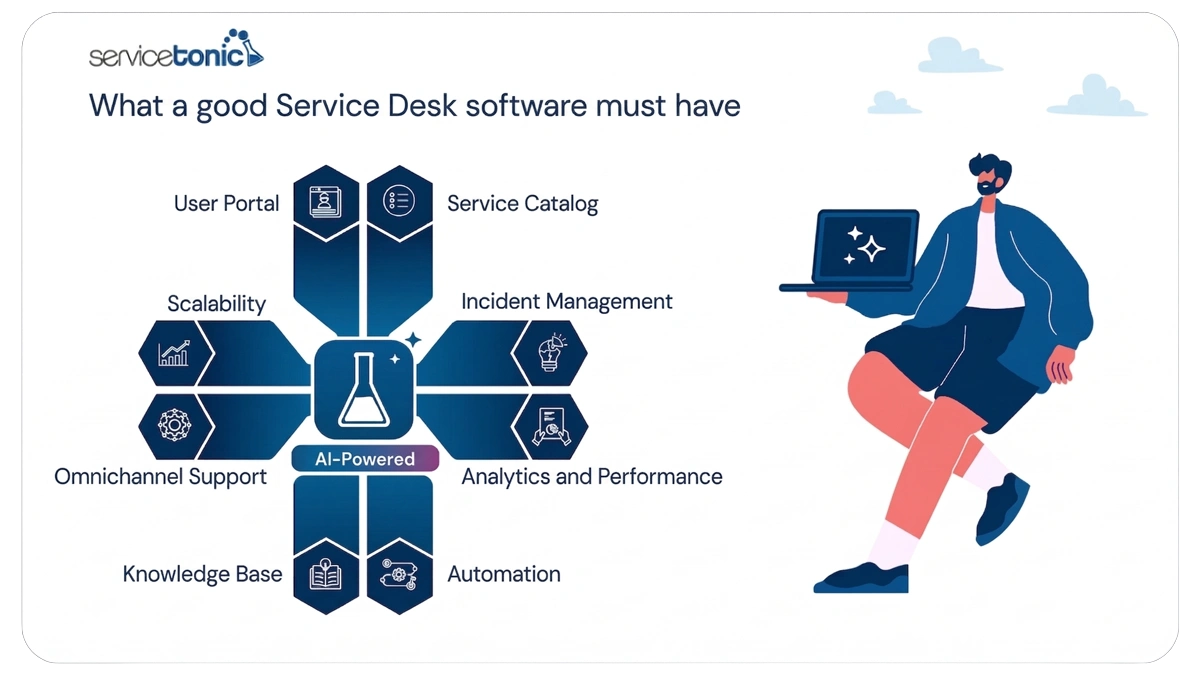
Service Desk features
Key features include:
- User Portal: lets users submit requests and resolve queries on their own. More on the User Portal.
- Service Catalog: makes it easy to define and manage every service you offer, with greater clarity and structure. More on the Service Catalog.
- Request and problem management: log, assign, and track every incident or request. More on Request Management.
- Custom reports: deliver the key data you need to keep improving customer support efficiency. More on Reports and Queries.
- Workflow automation: automate ticket handling, route incidents to the right agent, prioritize requests by SLA, and send smart notifications — making technical support faster and more efficient. More on Workflows.
- Knowledge base: centralize knowledge to maximize support team efficiency. More on the Knowledge Base.
- Omnichannel solution: manage user requests no matter which channel they come in through.
- Scalability for business growth: adapts as your users, services, and organizational requirements grow.
- Artificial Intelligence: deliver instant, effective answers to user requests with AI Agents in the User Portal, chat, or chatbot. With features like automatic categorization, ticket translation, history summaries, suggested solutions, and improved response drafting, AI also speeds up agent work. More on Artificial Intelligence.
Examples of services a Service Desk can manage
Here are a few examples of services ServiceTonic can manage as Service Desk software:
IT services
Thanks to solutions like NetworkTonic, companies can get ahead of incidents involving any IT asset connected to the network. For example, NetworkTonic detects when a software license expires or when a printer stops working, and turns those incidents into support tickets that any agent on the service can access.
This lets support teams act proactively and resolve incidents before they impact users or business operations.
Human Resources services
A Service Desk can also help HR teams centralize requests like vacation time, equipment, employee onboarding, and staff additions and departures.
With ServiceTonic, a user can submit a request — vacation days, for example — by phone, email, or WhatsApp. The platform turns it into a support ticket so the responsible agents can handle it and notify the user of any updates through the same channel they used to open the request.
Facilities Management services
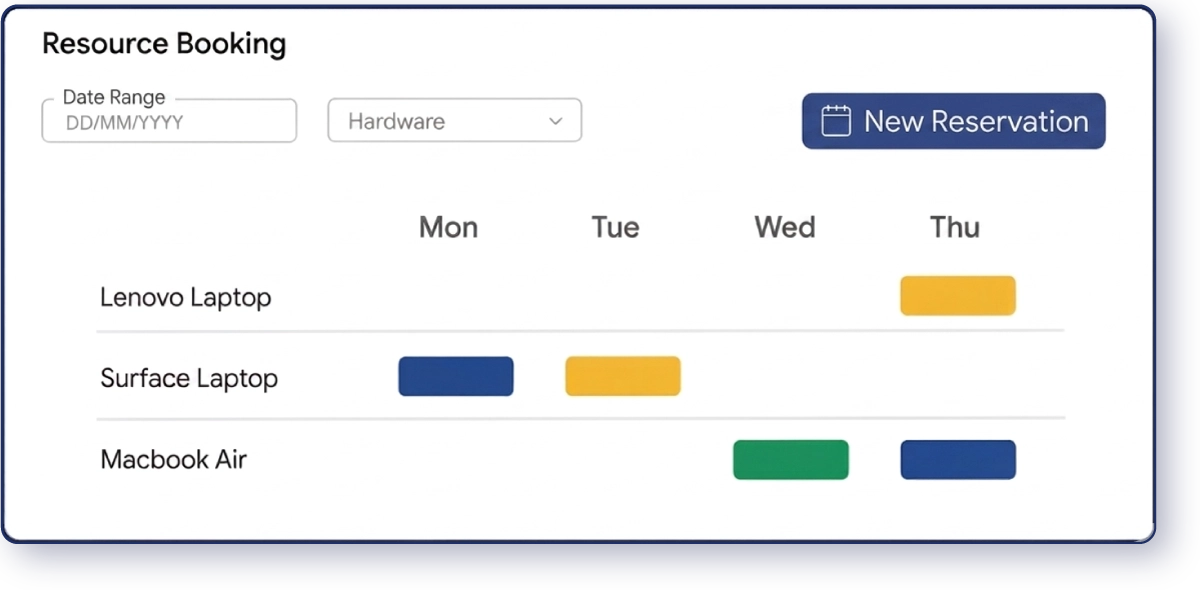
Facilities Management teams also benefit from a Service Desk. Booking meeting rooms or laptops, requesting furniture, or any other user request can become a ticket on a service.
For example, with ServiceTonic, a user can check the User Portal to see which meeting rooms are available, then select one and create the booking. That booking turns into a ticket visible to the agent on the same service, so they can track it in real time.
Customer service
Customer satisfaction is a pillar for any company, regardless of size or industry. Personalized, fast, and effective service is what drives — or undermines — your customers’ willingness to recommend your products or services to others.
That’s why ServiceTonic gives any company the ability to let customers open requests, report incidents, or resolve queries quickly through its Service Desk.
ServiceTonic offers multiple communication channels — phone, email, WhatsApp — that turn customer requests into tickets so agents can handle them as soon as they arrive. It also includes channels like chat, chatbot, and the User Portal, which combine knowledge bases with AI integration so customers can resolve their queries autonomously, without waiting on an agent.
Service Desk vs. Help Desk: key differences
Help Desk and Service Desk are both support tools that help manage requests, incidents, and problems — but they differ in scope and approach.
What is a Help Desk
A Help Desk is a support system that provides reactive assistance to users, focused on resolving problems and requests quickly. Its main goal is to handle one-off incidents and ensure operational continuity through simple ticket tracking and logging practices.
When to use a Help Desk
A Help Desk is the right fit when you need:
- Immediate support for one-off problems.
- Fast service for users with simple requests.
- Basic ticket logging, without managing complex workflows.
- Support in environments with low incident volume or standard processes.
When to use a Service Desk
A Service Desk is the right fit when you need to:
- Manage incidents and requests alike.
- Handle every case in a structured, proactive way.
- Document and share knowledge through knowledge bases.
- Coordinate with every area tied to the service.
- Optimize workflows and continuously improve support practices.
This approach helps the company optimize performance, centralize information, and manage incidents and requests in an organized, sustainable way.
Key differences between Help Desk and Service Desk
- A Help Desk focuses on the immediate resolution of incidents, while a Service Desk is a “service hub” that goes beyond support to manage end-to-end service processes.
- A Service Desk uses knowledge bases and documents solutions for future cases; a Help Desk applies more basic support practices.
- A Service Desk coordinates multiple teams and processes, while a Help Desk acts as a reactive point of contact.
In short, a Help Desk fixes problems; a Service Desk manages and improves the service.
You’ll find more differences between Help Desk and Service Desk here.
Steps to roll out a Service Desk in your company
For a Service Desk like ServiceTonic to deliver real value, it’s essential to define your processes, services, and ways of working up front. That way, your organization can properly structure user support, automate tasks, and ensure efficient management of requests and incidents.
Recommended steps:
- Analyze your company’s needs: The first step is knowing where your company stands, what problems exist, and what the goal of this rollout should be.
- Define objectives and scope: Establish which services will be managed, the support levels, and the expected outcomes for users and the organization. With ServiceTonic, you can add more services later, once it’s fully operational.
- Design processes and workflows: Create clear procedures for logging, assigning, and resolving tickets, optimizing processes and giving each agent an organized way to manage their tasks.
- Set up a service catalog: Document every service you offer, its support level, and the support procedures.
- Train your staff: Train agents on everything related to the service, system usage, best practices, and proper knowledge documentation.
- Build a knowledge base: Centralize solutions and procedures to enable fast problem resolution and knowledge transfer among agents.
- Train your AI Agents: ServiceTonic supports multiple AI Agents, each trained specifically to resolve a particular type of incident. The training is entirely your company’s own — the AI looks for answers in your internal documentation, specific URLs, or ticket history.
- Measure and optimize: Analyze system performance, resolution times, and process efficiency to ensure a better user experience and a productivity boost in service management.
This approach keeps your Service Desk running in an organized, efficient way that scales with your company’s growth and support needs.
See the questions to ask when choosing the right Service Desk software for your company.
ServiceTonic as your solution
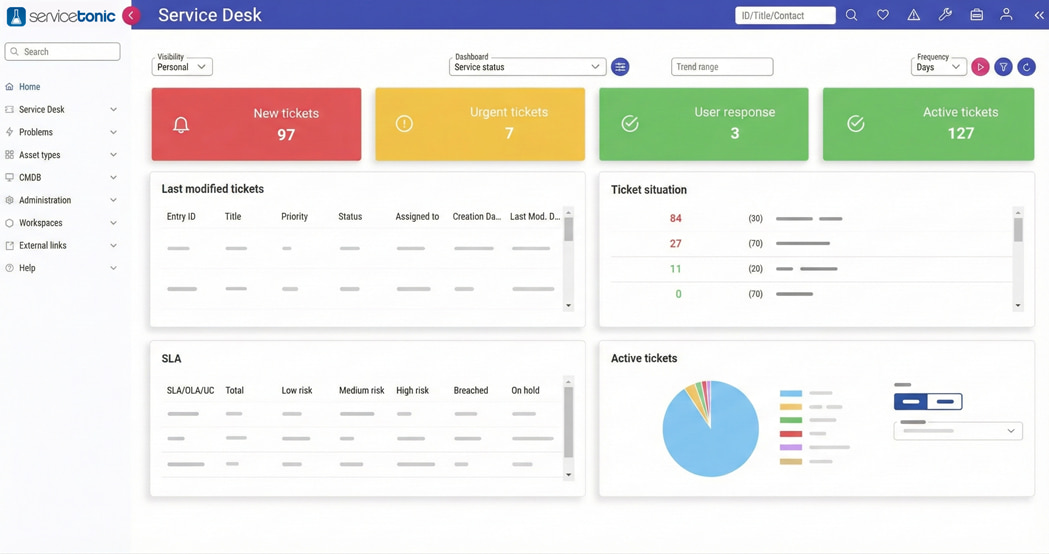
ServiceTonic is a Service Desk solution that centralizes the management of requests, incidents, and problems within any organization. The platform includes a powerful, intuitive ticketing system, a self-service portal for users, and tools for process automation and knowledge base creation and maintenance — making documentation and access to relevant information effortless. It also enables change management, performance tracking, and best-practice adoption, helping you boost efficiency, productivity, and the user experience.
With ServiceTonic, companies can optimize customer service and ensure organized, scalable support that grows with the business.
Frequently asked questions
1. What is a Service Desk?
A Service Desk is a “service hub” that provides a centralized point for managing requests, incidents, and problems within an organization. It acts as a single point of contact between users and the responsible teams, making it easier to manage and track tickets, resolve problems efficiently, and continuously improve the service.
2. What’s the difference between a Service Desk and a Help Desk?
A Help Desk focuses on providing reactive support and resolving one-off incidents, while a Service Desk takes a comprehensive approach to managing requests, incidents, and problems — incorporating workflows, knowledge bases, and metrics with a clear focus on continuous service improvement.
3. What is a Service Desk for in a company?
A Service Desk centralizes user support, manages requests and incidents in an organized way, documents solutions, and ensures service continuity and continuous improvement. It also shortens problem resolution times, improves team efficiency, and increases user satisfaction.
4. What functions does it perform?
The main functions include:
- Handling everything related to the service.
- Logging and classifying requests, incidents, and problems.
- Assigning tickets to the responsible team.
- Overseeing problem solving and resolution.
- Documenting solutions and maintaining knowledge bases.
- Generating reports on support performance and efficiency.
- Applying continuous improvement processes to the service.
5. What benefits does it deliver?
Rolling out a Service Desk lets you:
- Improve team productivity.
- Optimize change management and internal processes.
- Boost the efficiency of your support service.
- Reduce problem resolution times.
- Improve service quality and achieve greater user satisfaction.
Conclusion
In short, a Service Desk is an essential tool for centralizing the management of service requests, incidents, and problems within any organization, regardless of the area of operation. Rolling it out lets you optimize processes, ensure proper change management, improve team efficiency, and boost productivity in user support.
It also makes documentation, knowledge base use, ticket tracking, and report generation easier — driving greater user satisfaction and continuous service improvement. A structured approach to Service Desk rollout and operations ensures clear, efficient processes that adapt to your business’s growth and needs.
More on Service Desk: