
This type of solution helps companies centralize requests received by email, portal, chat, phone, or other channels, preventing incidents from being lost or handled in a disorganized way. It also makes it possible to prioritize tickets, automate tasks, monitor SLAs, and gain a clearer view of the team’s workload.
In this guide, we explain what a ticketing tool is, how it works, the differences between ticketing software and a Help Desk, Service Desk, or CRM, which features it should include, and when it is worth implementing in a company.
How a Ticketing System Works
A ticketing system works through a simple process: a request enters the system, is recorded as a ticket, classified, assigned to a responsible person, and tracked until it is resolved. This process helps centralize incidents, maintain full traceability for every request, and deliver a faster and more consistent service.
The usual workflow is as follows:
- An internal user or customer submits a request to the company by email, phone, Microsoft Teams, chat, chatbot, or another channel.
- The ticketing software records the request and, through automation, can classify it according to type, urgency, or priority.
- The ticket is assigned to an agent or support team.
- Every action taken on the ticket is recorded, ensuring complete traceability.
- Once the request has been resolved, the user receives a notification with the status or closure of the ticket.
The ticketing system is the core of a ticketing tool, as it turns each request into a structured and manageable record. This gives companies a complete overview of their workflow, helps them identify bottlenecks, and enables them to make data-driven decisions about the quality and efficiency of their support service.
What Information Does a Support Ticket Contain?
A support ticket may include information such as a description of the incident or request, its category, priority, status, entry channel, assigned agent, follow-up dates, and any interactions that take place during the process. This makes it possible to manage each case with full context, prevent information from being lost, and ensure continuity throughout the support process.
Benefits of Using a Ticketing Tool
Using a ticketing platform offers benefits for both support teams and customers or internal users:
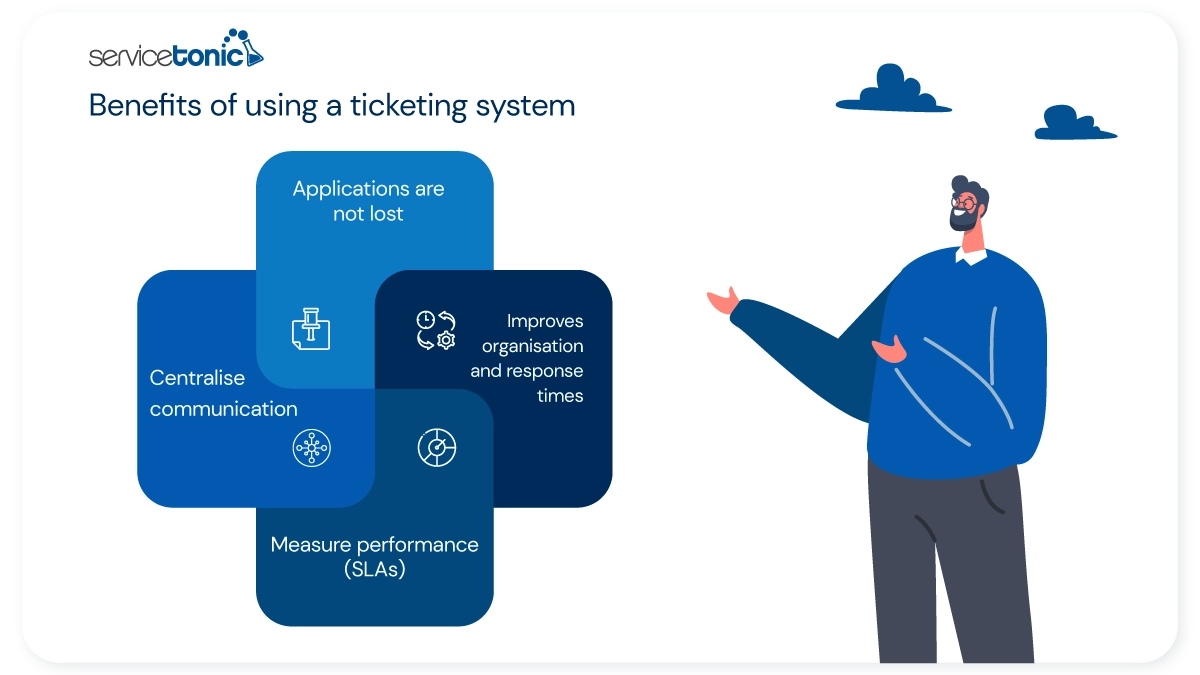
- No requests are lost: all requests are recorded in a single place, preventing information loss and duplication.
- Improved organization and response times: tickets can be classified and assigned through business rules, helping teams work in a more structured way.
- Performance can be measured: a ticketing system makes it easier to track metrics such as SLAs and assess service effectiveness.
- Communication is centralized: ideally, the platform should be omnichannel, allowing requests to be received by email, phone, chat, portal, or other channels without losing traceability.
As a result, organizations can reduce errors, improve communication between departments, and provide a more consistent and professional support experience.
Ticketing Tool Features
A good ticketing system should go beyond simply recording incidents and requests. It should provide comprehensive ticket management, make agents’ work easier, improve coordination between teams, and optimize the customer or end-user experience through a configurable ticketing tool.
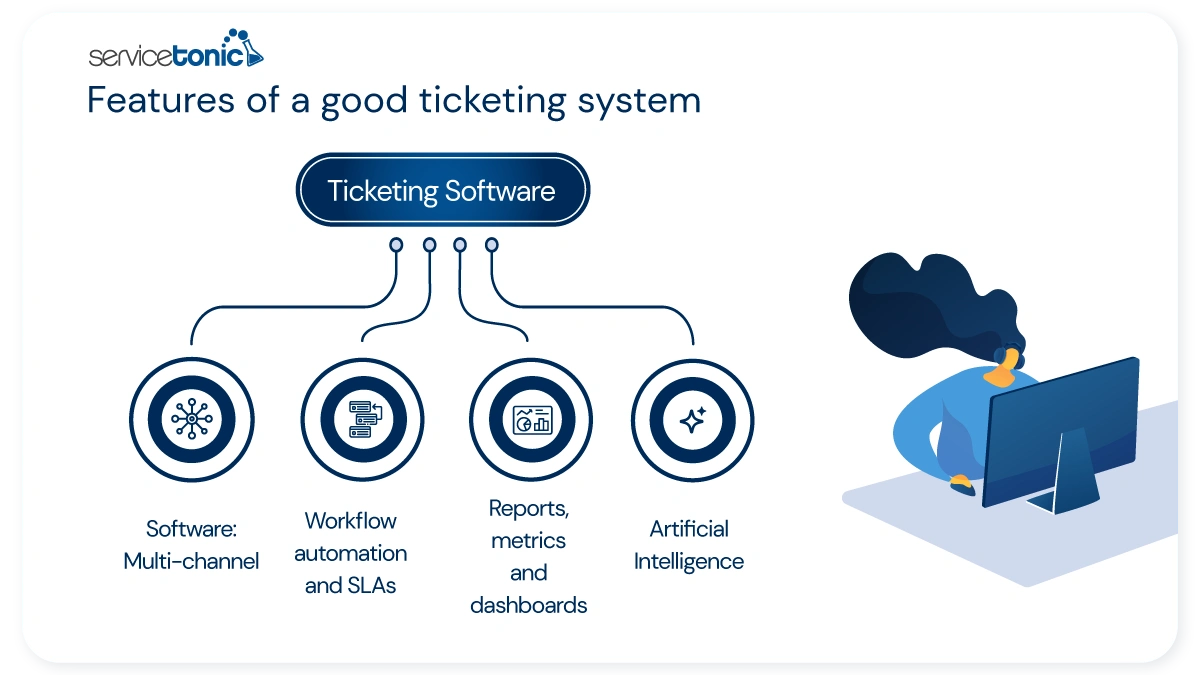
Omnichannel Ticket Management
An omnichannel ticketing solution centralizes all requests received through different channels—such as email, chat, phone, a user portal, or other contact points—in a single place.
This ensures that all support tickets are managed with the same level of traceability and priority, regardless of where they originated. As a result, information loss is reduced, work is better organized, and each request can be handled according to its type, urgency, and context.
Workflow and SLA Automation
Automation is essential for streamlining agents’ work and improving customer service. Workflows make it possible to define rules that automatically assign tickets to the most suitable agent or team, set priorities based on severity or type, and send personalized notifications to customers and technicians.
An advanced tool should also support service level agreement (SLA) management to monitor response and resolution times. Automated alerts help identify tickets that are approaching their deadlines and maintain consistent service quality.
In solutions such as ServiceTonic, these rules can be adapted to each company’s internal processes and organizational structure without requiring any programming.
Self-Service Portal and Knowledge Base
Another important feature is a user and self-service portal where users can submit requests, check the status of their tickets, and access useful information without always having to rely on an agent.
This is complemented by a Help Desk knowledge base, which allows companies to publish articles, frequently asked questions, and procedures so that users can find solutions on their own. This reduces the volume of repetitive tickets, improves user autonomy, and helps the support team focus on higher-value or more complex cases.
Reports, Metrics, and Dashboards
Ticketing software should provide a complete view of service performance. Reports, metrics, and dashboards make it possible to analyze key indicators such as response times, workload, SLA compliance, and customer satisfaction.
Access to this information supports data-driven decision-making, helps identify bottlenecks, and encourages continuous service improvement.
In addition, when customized dashboards can be tailored to each role or department, it becomes easier to adapt monitoring and reporting to the specific needs of every team.
Integrations with Other Systems
A ticketing system should also integrate with other systems used in the company’s day-to-day operations, such as email, collaboration tools, CRM, ERP, telephony, or corporate directories.
These integrations help eliminate manual tasks, improve the flow of information between departments, and provide greater context for each request. The better connected the tool is to the rest of the company’s digital ecosystem, the more efficient support management becomes.
Artificial Intelligence for Users and Agents
AI Agents can support self-service by resolving frequently asked questions, guiding users, or routing requests correctly when human intervention is required. Copilot features, meanwhile, can assist agents by summarizing ticket histories, suggesting responses, translating conversations, automatically categorizing requests, or improving the wording of replies.
The result is faster, more consistent, and more efficient support for both users and support teams.
When Does a Company Need a Ticketing Tool?
Not every organization needs to implement a ticketing tool from the outset, but there comes a point when managing requests through email, phone calls, or spreadsheets is no longer sufficient.
A company usually needs ticketing software when the volume of queries, incidents, or requests begins to require greater control, traceability, and coordination between teams. In this context, having a structured system makes it possible to organize work more effectively, prevent errors, and provide faster and more consistent support.
Some common signs include:
- Requests are lost or left unanswered because they arrive through different channels.
- There is no clear view of the status of each incident or who is responsible for it.
- Duplicate responses or delays in resolution occur.
- It is difficult to prioritize requests according to their urgency or impact.
- The team cannot measure response times, workload, or SLA compliance.
- Several departments are involved in handling requests, but coordination between them is poor.
- Users need to check the status of their requests or access self-service options.
In these situations, a ticketing system helps centralize communication, assign responsibilities, automate repetitive tasks, and maintain complete tracking of every case. It also provides useful information for identifying bottlenecks, improving processes, and making data-driven decisions.
Rather than being a solution designed only for large companies, a ticketing tool is useful for any organization that wants to professionalize its support operations and improve the experience of customers or internal users.
Ticketing Tool, Help Desk, Service Desk, or CRM: Key Differences
Although these terms are sometimes used interchangeably, a ticketing tool, Help Desk, Service Desk, and CRM do not address exactly the same needs.
A ticketing solution focuses on recording, organizing, and tracking incidents, queries, or requests through tickets. Its main purpose is to ensure that every request has full traceability, an assigned owner, a priority level, and a clear status.
Help Desk software expands on this approach and is designed to manage support more comprehensively. In addition to recording tickets, it usually includes features such as automation, SLA management, self-service, a knowledge base, reporting, and integrations to make support operations more efficient.
Service Desk software goes one step further and is used when an organization requires broader service management capabilities. It covers not only incidents and requests but also processes such as problem management, change management, asset management, and the service catalog, usually within a more structured service management framework.
A CRM, on the other hand, is primarily designed to manage customer relationships and sales opportunities. Although it can record interactions, its main purpose is not to organize technical support or incidents with the same level of depth as a ticketing tool or Help Desk.
It is also important to distinguish these solutions from more basic methods such as email or spreadsheets. Email may be sufficient when request volumes are very low, and a spreadsheet can be useful as a temporary support tool, but both fall short when traceability, prioritization, automation, and visibility into the team’s workload are required.
Comparison Table
| Solution | Main Objective | What it Manages | When to Use It |
|---|---|---|---|
| Communication | Individual messages | When the volume of requests is very low | |
| Spreadsheet | Manual record-keeping | Lists and basic statuses | When the process is simple or temporary |
| Ticketing tool | Organize request | Tickets, owners, priorities, and statuses | When traceability and control are required |
| Help Desk software | Manage support | Tickets, channels, SLAs, automation, self-service and reporting | When there is a structured support team |
| Service Desk software | Manage services | Incidents, requests, problems, changes, assets, and service catalog | When broader service management is required |
| CRM | Manage customer relationship | Leads, opportunities, customers, and sales | When the main objective is sales |
In practice, a ticketing solution is often the starting point for organizing support, while a Help Desk or Service Desk enables an organization to evolve toward more comprehensive support models. The right choice will depend on the volume of requests, the complexity of the processes, and the organization’s level of maturity in service management.
How to Choose the Right Ticketing Tool
Choosing a ticketing tool is not simply a matter of comparing prices or individual features. What matters most is assessing whether the solution can adapt to the company’s processes, the volume of requests it manages, and the level of coordination required between teams.
Several factors should be taken into account:
- Ease of use and configuration: the tool should be intuitive for both agents and administrators, while allowing forms, statuses, categories, rules, and workflows to be adapted without unnecessary complexity.
- Automation capabilities: it should be possible to assign tickets, set priorities, trigger alerts, and define workflows that reduce manual tasks.
- SLA management: this is essential for monitoring response and resolution times, especially when service commitments or multiple support levels are involved.
- Omnichannel support: the tool should centralize requests received through email, portal, chat, phone, or other channels.
Self-service and knowledge base: these features help reduce repetitive tickets and improve the user experience. - Reports and dashboards: access to clear metrics makes it easier to identify recurring incidents, measure performance, and improve processes.
- Integrations: the better the tool connects with other company systems, the more efficient support management will be.
- Scalability: the solution should meet both current needs and the future growth of the team or ticket volume.
- Artificial intelligence: in some organizations, AI can provide significant value by automating tasks, assisting agents, and improving the user experience.
Common Mistakes When Implementing a Ticketing Tool
Choosing the right solution is important, but implementing it correctly is just as essential. Some common mistakes can limit the success of the project from the outset:
- Not involving the team from the beginning: if agents and managers do not take part in defining requirements, adoption is usually more difficult.
- Choosing based on price alone: a basic solution may quickly fall short if it does not cover automation, traceability, SLA management, self-service, or analytics.
- Failing to plan the migration: moving from email, Excel, or another tool without an organized transition can lead to information loss and confusion.
- Not defining processes before configuring the tool: automating a disorganized process does not solve the problem. Criteria, responsibilities, and workflows should be established first.
- Not training teams: to obtain real value from the tool, users need to understand its features and the best practices for using it.
- Not reviewing metrics after implementation: measuring results is essential for identifying bottlenecks and optimizing the service over time.
A well-planned implementation ensures that the tool does more than simply record tickets. It becomes a solid foundation for improving support organization, internal coordination, and the user experience.
ServiceTonic as a Ticketing Tool
ServiceTonic is Help Desk and ticketing software that enables organizations to centralize, organize, and track support requests in a single environment. As a ticketing tool, it helps record incidents, assign them to the right team, maintain full traceability for each case, and improve coordination between departments.
In addition to ticket management, ServiceTonic includes features that allow the platform to be adapted to each organization’s processes, such as workflow automation, SLA configuration, omnichannel management, a self-service portal, a knowledge base, reports, and dashboards.
It also includes artificial intelligence capabilities designed to support both users and agents. AI Agents can assist with self-service and initial support, while Copilot can help summarize tickets, suggest responses, translate conversations, and improve wording, making support management faster and more efficient.
Another important advantage is its no-code configuration, which makes it easier to adapt forms, business rules, statuses, categories, and processes to the specific needs of each company.
In this respect, ServiceTonic can be a suitable option for organizations looking not only to record tickets, but also to implement a more comprehensive solution for managing support with greater control, traceability, and continuous improvement capabilities.
Frequently Asked Questions
What Is a Ticketing Tool?
A ticketing tool is software that enables support requests to be recorded, organized, and resolved through tickets. Each request is identified, assigned, and tracked through to closure to improve traceability and service quality.
What Is a Support Ticket?
A support ticket is the record of an incident, query, or request within the system. It may include information such as a description, priority, status, assigned owner, entry channel, and follow-up activity.
What Is a Ticketing Tool Used For?
It is used to centralize requests, prevent incidents from being lost, assign responsibilities, prioritize cases, automate tasks, and measure support performance through metrics and SLAs.
How Does a Ticketing System Work?
It works by turning each request into a ticket that is recorded, classified, assigned, and tracked until resolution. Throughout the process, every action is logged to maintain full traceability.
What Is the Difference Between a Ticketing Tool and a Help Desk?
A ticketing tool focuses on recording and managing requests through tickets. A Help Desk usually also includes automation, SLA management, self-service, a knowledge base, reports, and integrations.
What Features Should a Good Ticketing Tool Include?
At a minimum, it should include omnichannel management, workflow automation, SLA management, a self-service portal, a knowledge base, reports, integrations, and artificial intelligence capabilities for both users and agents.
Conclusion
Having a ticketing tool is not just about organizing incidents. It is about professionalizing the way a company responds to its users and customers. When support no longer depends on scattered emails, improvised responses, or unclear processes, the organization gains greater control, as well as more trust, consistency, and capacity for improvement.
In this sense, implementing the right tool is not simply an operational decision. It is a way to turn customer service and support into a more robust, measurable process that is ready to grow alongside the company.
Take the next step and discover ServiceTonic’s Help Desk and ticketing software.