
A Service Desk is a centralized point that allows managing incidents, requests, and services between users and responsible teams, normally within the IT area although it is extensible to the rest of the departments.
The function of the Service Desk is to register each request, whatever the entry channel into a system, whether by email, phone, chat, chatbot, or user portal, and convert it into a ticket. That ticket is managed by the responsible agent and allows full traceability of the request.
This allows improving support organization, reducing response times, increasing productivity, and ensuring service continuity.
Service Desk acts as a single channel of contact that facilitates communication, control, and continuous improvement in service management within an organization.
Table of Contents
What Is a Service Desk? Definition, Functions, Benefits, and How It Works
In this context, the Service Desk is consolidated as the single point of contact that centralizes incident management, requests, and services within an organization. Besides having a tool, it is a strategic function that allows registering, organizing, and resolving user requests through a ticketing system, ensuring traceability, control, and operational efficiency.
Its correct implementation, through specialized software, boosts support quality, optimizes response times, and favors more agile, measurable, and results-oriented service management.
The operation of a Service Desk is based on receiving, registering, classifying, and assigning each request until its resolution, documenting all information to strengthen knowledge management.
This process allows standardizing support, reducing recurring incidents, improving support organization, and identifying optimization opportunities, contributing to more efficient and sustainable service management.
Main Functions of a Service Desk
The main functions of a Service Desk are:
- Centralize request management and incidents
- Classify and assign tickets to the responsible team
- Supervise problem solving and resolution
- Manage and document problem management
- Maintain communication with users
- These functions allow for orderly and efficient service management.
Benefits of a Service Desk
The Service Desk brings important benefits to the organization:
- Improve the management of requests and services
- Reduce problem resolution times
- Increase operational efficiency
- Improve the quality of problem solving and resolution
- Allow greater control and tracking of requests
- Improve the customer experience
What Is a Service Desk For? Incident Management, Problem Resolution, and Customer Service
A Service Desk serves to manage in a structured way all incidents, requests, and support needs within an organization. Its goal is to ensure that each request is registered, correctly classified, and efficiently resolved, maintaining control and traceability at all times.
In incident management, it allows identifying, prioritizing, and assigning each case according to its impact and urgency, guaranteeing adequate response times and reducing service interruptions.
Regarding problem resolution, it facilitates root cause analysis, documentation of solutions, and the use of knowledge bases to prevent errors from repeating.
Furthermore, the Service Desk fulfills an essential function in internal or external customer service, as it acts as a single point of contact, providing a clear communication channel, tracking, and continuous support.
It improves user experience, increases operational efficiency, and contributes to more organized, measurable, and continuous improvement-oriented service management.
Who Needs Service Desk Software?
A Service Desk software is necessary in organizations that manage a high volume of requests, incidents, or problems, and need to centralize their management to ensure efficient tracking and resolution, ensuring optimal service delivery.
This type of software is needed by:
- Companies with many users making support requests
- Organizations that manage internal or external services
- Teams needing to control and resolve problems in a structured way
- Departments receiving frequent requests (IT, HR, customer service, etc.)
- Companies seeking to improve organization and tracking of their services
- Organizations needing to improve efficiency and control of requests
This type of software allows organizing requests, improving management, and ensuring correct problem resolution.
How Does Service Desk Software Work? Service System for Best Practices
A Service Desk software works as a platform that centralizes the help desk and allows managing requests, incidents, and problems in a structured way. It acts as the first point of contact and as a Help Desk that registers each request, organizes it, and facilitates its tracking until resolution, clearly defining the processes for this and allowing the intervention of each responsible support agent.
Among its key features are the ability to document solutions, generate knowledge, collect user feedback, and support reporting, which facilitates control, identification of improvements, and continuous service optimization.
The operation is based on a structured process:
- Request or problem registration: The user sends a request, incident, or problem through the system. The software registers it in a ticket within the support service.
- Classification and prioritization: The ticket is classified according to its type, priority, and impact, allowing for proper organization of request and problem management.
- Assignment to the responsible party: The system assigns the ticket to a technician or responsible team, who will be in charge of managing and resolving the request or problem.
- Management and resolution: The technician analyzes the case, applies a solution, and tracks it until resolution. During this process, the information is recorded for future reference.
- Documentation and knowledge generation: The solution is documented within the system, creating a knowledge base that facilitates the resolution of future similar problems.
- Closure and reporting: Once resolved, the ticket is closed, and the system allows for report generation to analyze performance, identify improvements, and optimize the service.
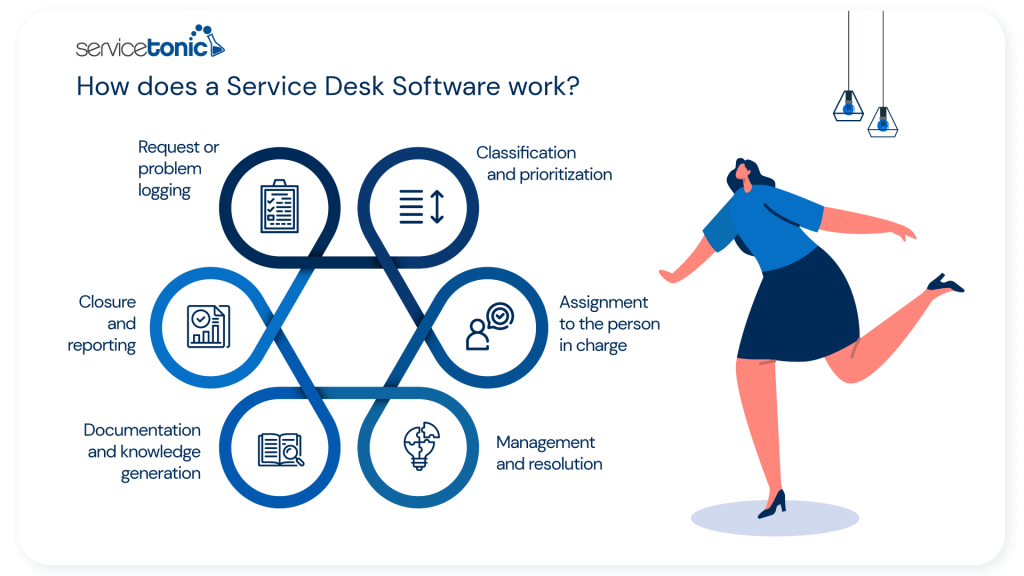
This process allows the help desk to manage requests and problems in an organized manner, ensuring efficiency, control, and continuous improvement of the support service.
Types of Service Desk
There are different types of Service Desk, which differ by their scope, team location, and way of interacting with users, as well as by the processes thereof that structure their operation. Each type adapts to the organization’s needs and allows managing requests, incidents, and problems efficiently, optimizing support and improving user satisfaction.
Main Types of Service Desk According to Process and Performance Needs
Among the different types of Service Desk according to process and performance needs, we can find the centralized Service Desk, where all requests and tickets are managed from a single point of contact to ensure greater control and consistency in processes; the distributed Service Desk, which operates with teams in different locations under common standards; the virtual or remote Service Desk, which works through a ticketing system and digital tools; the specialized Service Desk, aimed at specific areas of the organization; and the shared or federated Service Desk, which integrates several departments under the same platform and allows sharing knowledge and knowledge bases to optimize problem resolution.
A solution like ServiceTonic adapts to these different Service Desk models, as it offers a configurable platform that centralizes request management, facilitates distributed and virtual work, and allows structuring processes according to the specific needs of each organization, maintaining control and operational efficiency regardless of the adopted model.
Service Desk vs Help Desk: Main Differences
The Help Desk and the Service Desk are support tools that help manage requests, incidents, and problems, but they differ in their scope and focus. The Help Desk focuses on providing immediate support and resolving specific incidents, while the Service Desk integrates more comprehensive processes, including workflow management, knowledge documentation, and the use of knowledge bases to improve support practices. Understanding these differences allows applying the appropriate tool according to the organization’s needs.
What Is a Help Desk
A Help Desk is a support system that provides reactive assistance to users, focusing on resolving problems and requests quickly. Its main objective is to address specific incidents and ensure operational continuity through simple ticket tracking and logging practices.
When to Use a Help Desk
The Help Desk is appropriate when you need:
- Immediate support for specific problems
- Fast attention to users with simple requests
- Basic ticket logging without the need to manage complex workflows
- Support in environments with a low volume of incidents or standard processes
When to Use a Service Desk
The Service Desk is more appropriate when you require:
- Manage requests, incidents, and problems in a structured way
- Document and share knowledge through knowledge bases
- Coordinate multiple teams and support areas
- Optimize workflows and continuously improve support practices
This approach allows the organization to improve efficiency, centralize information, and facilitate problem resolution in an organized and sustainable way.
Key Differences Between Help Desk and Service Desk
- The Help Desk focuses on immediate incident resolution, while the Service Desk manages comprehensive service processes.
- The Service Desk uses knowledge bases and documents solutions for future cases; the Help Desk applies more basic support practices.
- The Service Desk coordinates multiple teams and processes, while the Help Desk acts as a reactive point of contact.
Here you will find more differences between Help Desk and Service Desk
What Good Service Desk Software Should Have
Good Service Desk software must allow efficiently managing requests, incidents, and problems, facilitating service organization and continuous improvement. It must contribute to business growth, optimize team performance, and guarantee organized and quality user support. Likewise, it must support best practices in service management, reduce the average resolution time, and offer tools that facilitate access to information and interaction with users.
The essential features include:
- User portal: allows users to submit requests and consult information.
- Service catalog: facilitates the definition and management of all offered services, improving clarity and organization.
- Request and problem management: registers, assigns, and tracks each incident or request.
- Performance tracking: provides metrics on response time, average resolution time, and support efficiency.
- Workflow automation: optimizes repetitive processes and improves operational efficiency.
- Knowledge base and best practice documentation: centralizes information for problem resolution and team training.
- Multichannel customer service support: allows managing requests through different communication channels.
- Scalability for business growth: adapts to the increase in users, services, and organizational requirements.
These functions ensure that the Service Desk software contributes to improving operational efficiency, user satisfaction, and business continuity.
How to Implement a Service Desk in Your Company
Implementing a Service Desk in a company allows centralizing the management of requests, incidents, and problems, optimizing internal processes and improving user support. A planned approach ensures correct change management, efficient use of technology, and organized tracking of all requests, which contributes to increasing productivity and achieving greater user satisfaction.
Recommended steps to implement a Service Desk:
- Define objectives and scope: Establish which services will be managed, support levels, and expected outcomes for users and the organization.
- Select the right software: Choose a system that allows efficient request management through a ticketing system, facilitates change management, and provides metrics on service performance.
- Design processes and workflows: Create clear procedures to register, assign, and resolve tickets, optimizing processes and allowing each support agent to manage their tasks in an orderly manner.
- Establish a service catalog: Document all offered services, their support levels, and support procedures.
- Train staff: Train agents in using the system, best practices, and correct knowledge documentation.
- Implement a knowledge base: Centralize solutions and procedures that facilitate rapid problem resolution and knowledge transfer between agents.
- Measure and optimize: Analyze system performance, resolution times, and process efficiency, ensuring greater user satisfaction and an increase in productivity in service management.
This approach allows the Service Desk to function in an organized, efficient manner adaptable to company growth and its support needs.
ServiceTonic as a Solution
ServiceTonic is a Service Desk solution that allows centralizing the management of requests, incidents, and problems within any organization. Its platform includes an intuitive ticketing system, a self-service portal for users, and tools for creating and maintaining knowledge bases, facilitating documentation and access to relevant information. In addition, it allows for change management, performance tracking, and the application of best practices, which contributes to improving efficiency, productivity, and user satisfaction.
With ServiceTonic, companies can optimize customer service and ensure organized and scalable support according to business growth.
Frequently Asked Questions
1. What is a Service Desk?
A Service Desk is a centralized point that allows managing requests, incidents, and problems within an organization. It acts as a single point of contact between users and responsible teams, facilitating management, ticket tracking, and efficient problem resolution.
2. What is the difference between Service Desk and Help Desk?
The Help Desk focuses on providing reactive support and resolving specific incidents, while the Service Desk comprehensively manages requests, incidents, and problems, incorporating workflows, knowledge bases, and metrics to improve efficiency and service continuity.
3. What is a Service Desk for in a company?
A Service Desk serves to centralize user support, manage requests and incidents in an organized way, document solutions, and ensure service continuity. It also allows reducing problem resolution time, improving team efficiency, and increasing user satisfaction.
4. What functions does a Service Desk fulfill?
The main functions include:
- Register and classify requests, incidents, and problems
- Assign tickets to the responsible team
- Supervise problem solving and resolution
- Document solutions and maintain knowledge bases
- Generate reports on support performance and efficiency
5. What benefits does a Service Desk provide?
- Implementing a Service Desk allows:
- Improving team productivity
- Optimizing change management and internal processes
- Increasing help desk efficiency
- Reducing problem resolution times
- Improving support quality and achieving greater user satisfaction
Conclusion
In summary, a Service Desk is an essential tool to centralize the management of requests, incidents, and problems within any organization, regardless of the operating area. Its implementation allows optimizing processes, guaranteeing correct change management, improving team efficiency, and increasing productivity in user support.
Furthermore, it facilitates documentation and the use of knowledge bases, ticket tracking, and report generation, which contributes to greater user satisfaction and continuous service improvement. A structured approach to the implementation and operation of the Service Desk ensures that processes are clear, efficient, and adaptable to business growth and needs.