
- What Is the Best Help Desk Software for a Medium-Sized Business?
- Why a Medium-Sized Business Needs Help Desk Software
- What Help Desk Software Should Offer a Medium-Sized Business
- Benefits of Choosing an Adaptable Help Desk
- Security and Trust in Help Desk Software
- How ServiceTonic Meets the Needs of a Medium-Sized Business
- Frequently Asked Questions About Help Desk Software for Medium-Sized Businesses
- Conclusion
Choosing the right Help Desk software makes it possible to centralize these requests, automate tasks, and prepare service management to grow with greater organization, agility, and control.
What Is the Best Help Desk Software for a Medium-Sized Business?
There is no single Help Desk software solution that is best for every medium-sized business. The right solution depends on the volume of requests, the number of agents and users, the departments involved, the complexity of the processes, and the company’s growth plans.
In general, a medium-sized business should look for a flexible, scalable, and easy-to-implement platform that can automate tasks, manage service levels, provide self-service options, and adapt forms and workflows without constantly relying on custom development.
It is also important for the solution to support gradual growth. The company can start by managing tickets and incidents, then later add asset, change, and problem management, Artificial Intelligence, or processes from other departments.
Why a Medium-Sized Business Needs Help Desk Software
In a medium-sized business, support is no longer an occasional task but a key process for sustaining growth. As the number of users, customers, assets, and departments involved increases, so does the need to organize how requests are received, managed, and resolved within a ticketing system.
Preventing Requests from Getting Lost in Emails and Messages
When each request arrives through a different channel, some may easily go unanswered, be duplicated, or depend on one person’s memory. Help Desk software brings all requests together in a single environment and assigns them to the appropriate team, improving communication and preventing a lack of visibility.
Prioritizing Urgent Requests Without Losing Sight of the Rest
Not all incidents have the same impact. A Help Desk tool makes it possible to classify requests, define priorities, and establish service levels so teams can address the most critical cases first without losing track of the remaining requests.
Knowing What Has Been Done and What Remains Pending
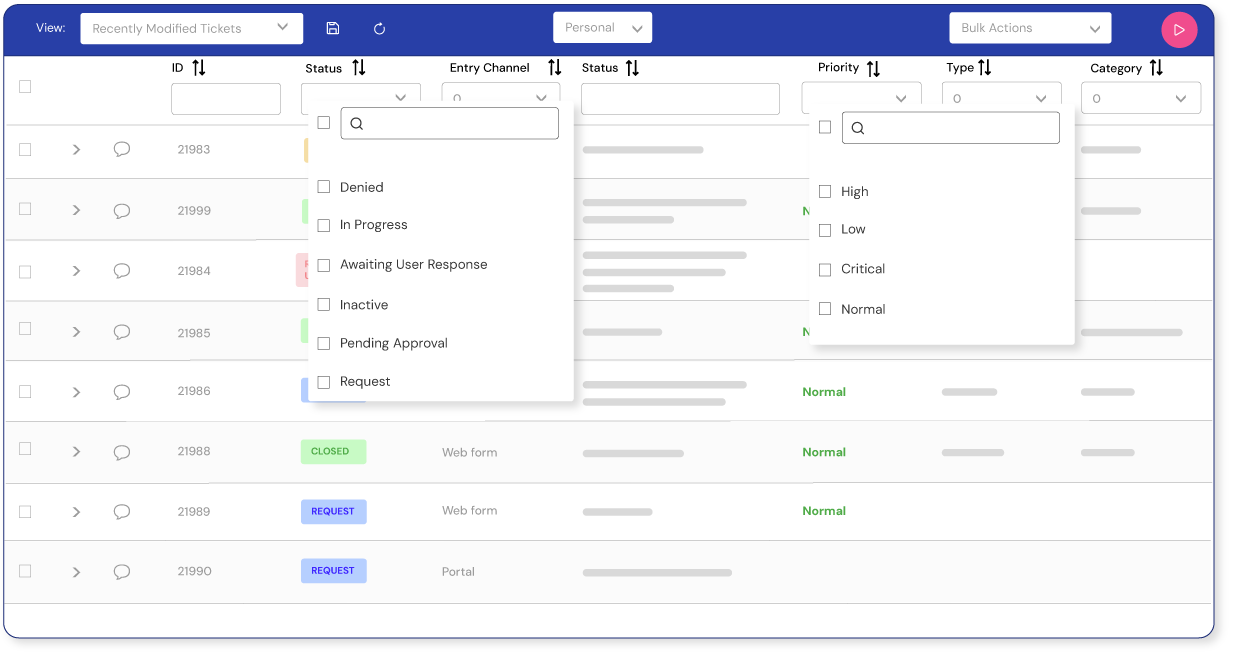
In a growing company, resolving incidents is not enough. It is also necessary to know who has been involved, what actions have been taken, and the current status of each request. This traceability provides visibility, helps prevent confusion, improves coordination, and makes it easier to maintain control over the service.
Reducing Manual Tasks in Day-to-Day Management
Assigning tickets, sending notifications, changing statuses, or requesting approvals can take up most of the team’s time when handled manually. Help Desk software makes it possible to automate these actions so teams can focus on resolving problems, handling higher-value requests, and improving productivity.
Preparing Support for Continued Growth
As the number of teams, services, and departments involved increases, support management must evolve without losing control or traceability. A flexible solution makes it possible to start with incident management and gradually expand its scope to include ITSM and ESM processes, automation, user portals, or asset management.
What Help Desk Software Should Offer a Medium-Sized Business
Medium-sized businesses need a Help Desk solution that brings structure without adding complexity. The tool should be able to manage more requests, users, and departments without requiring the organization to switch systems whenever it grows. For this reason, it is essential to choose a scalable, configurable solution designed to automate processes.
Flexibility to Adapt to Existing Processes
The tool should make it possible to adapt forms, statuses, permissions, and workflows to the needs of each organization, without forcing teams to change their processes to fit a rigid solution.
Scalability to Support Growth
The solution should be able to accommodate new users, agents, services, and departments, while also allowing more advanced features to be added without requiring a platform change.
Ease of Implementation
The tool should be implemented in phases, starting with the highest-priority processes. A gradual rollout reduces initial complexity and allows teams to adopt the platform before expanding its scope.
Quality of Vendor Support
The implementation and evolution of a Help Desk do not depend on technology alone. Having accessible, responsive support helps organizations configure processes, resolve issues, and make better use of the platform’s features. A strong support team also enables a faster implementation tailored to the needs of end users.
Automation of Tasks, Notifications, Approvals, and Escalations
Automation helps reduce repetitive tasks and prevent manual errors. The solution should make it possible to create rules for assigning tickets, sending notifications, escalating incidents, triggering approvals, or changing statuses automatically according to each defined process.
Omnichannel Management
Omnichannel Help Desk software should centralize requests from internal users or customers, regardless of the channel they use: phone, email, chat, chatbot, WhatsApp, or a user portal. This ensures that every request is recorded and can be handled from a single environment. It is also important for agent responses to be added to the ticket and delivered to the user through the same channel they used to make contact.
Performance Metrics and Reports for Data-Driven Decision-Making
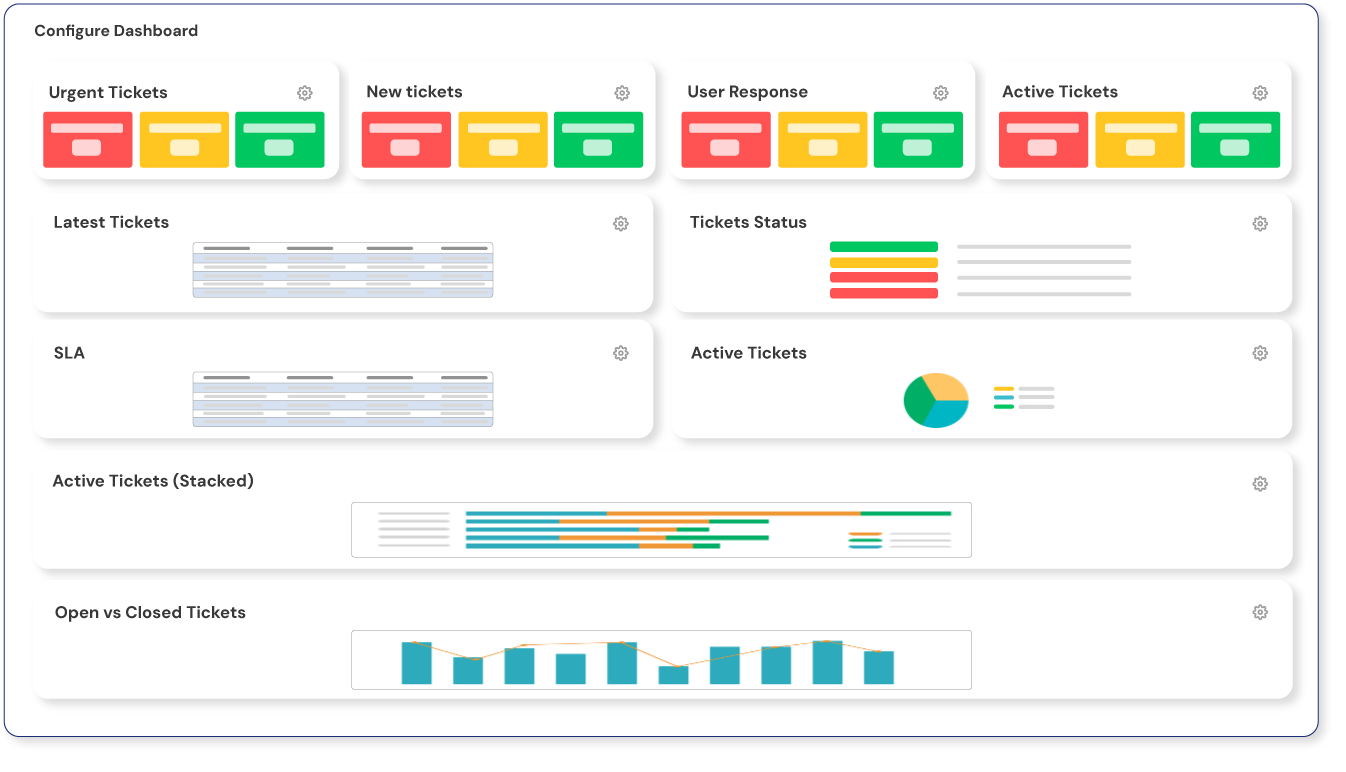
A Help Desk should not only help resolve tickets; it should also support continuous service improvement. Reports make it possible to analyze response times, resolution times, request volumes, SLA compliance, workloads, and areas for improvement. With these performance metrics, the company can make data-driven decisions and optimize its processes.
Artificial Intelligence
A Help Desk powered by Artificial Intelligence should be able to use the knowledge base, ticket history, internal documentation, corporate URLs, and platforms such as SharePoint as sources of information. This makes it possible to provide more accurate answers, resolve frequently asked questions more quickly, and reduce agents’ operational workload without losing human oversight.
| Criterion | What to the solution Should Provide |
|---|---|
| Flexibility | Adapt forms, statuses, permissions, and workflows to the company’s processes |
| Scalability | Add new users, services, departments, and features without changing platforms |
| Ease of implementation | Enable a phased rollout, starting with the highest-priority processes |
| Vendor support | Provide assistance with the configuration, implementation, and evolution of the tool |
| Automation | Manage assignments, notifications, approvals, SLAs, and escalations through rules |
| Omnichannel capabilities | Centralize requests and interactions from different channels |
| Reports and metrics | Measure response and resolution times, volume, workload, SLA compliance, and service quality |
| Artificial intelligence | Use company information to provide more accurate answers and reduce operational workload |
| Security | Protect information through roles, permissions, traceability, and access controls |
| Self-service | Provide a portal where users can submit request, check their status, and access the knowledge base |
Benefits of Choosing an Adaptable Help Desk
Choosing adaptable Help Desk software makes it possible to improve support management without limiting the company’s growth. The key is to have a solution that can adjust to new teams, processes, and departments while maintaining control over information and service quality.
Higher Productivity and Fewer Manual Tasks
Automating assignments, notifications, approvals, and escalations reduces the time spent on repetitive tasks. This allows teams to focus on resolving incidents, handling higher-value requests, and improving productivity.
Greater Visibility into Tickets, Assets, and Processes
An adaptable Help Desk centralizes tickets, assets, users, communications, and completed actions. This comprehensive view makes it easier to track each case, prevents information loss, and helps identify bottlenecks or areas for improvement.
A Better Experience for Employees, Customers, and Agents
When requests are submitted through a clear portal with appropriate forms and status tracking, the experience improves for everyone. Employees and customers know where to go, while agents have more context to respond quickly and accurately.
The Ability to Scale Without Changing Tools
A scalable solution makes it possible to add new users, departments, and processes without migrating to another platform. This protects the initial investment and allows service management to evolve alongside the organization.
Security and Trust in Help Desk Software
Help Desk software manages sensitive information about users, customers, incidents, assets, access rights, and internal processes. For this reason, security should be a key criterion when choosing a solution for a medium-sized business. It is not only about resolving tickets, but also about protecting the data that flows through the service.
Why Security Is Essential for Medium-Sized Businesses
As a company grows, so does the volume of information it manages and the number of people who have access to it. Without a secure tool, risks may arise from incorrect permissions, information loss, uncontrolled access, or a lack of traceability over the actions performed.
ISO 27001 as a Guarantee for Information Security Management
ISO 27001 certification provides an additional guarantee for information security management. In this regard, ServiceTonic strengthens the confidence of companies that need a platform designed to manage sensitive data, internal processes, and support communications in line with demanding security standards.
Data Protection, Permissions, and Access Based on Each Profile
ServiceTonic makes it possible to define roles, permissions, and access rights according to each user or department profile. This configuration helps protect information, separate sensitive data, and ensure that each person can only view or manage the information relevant to their responsibilities.
How ServiceTonic Meets the Needs of a Medium-Sized Business
Based on the criteria outlined above, ServiceTonic brings together a range of capabilities that may be well suited to medium-sized businesses looking to professionalize and expand their support management.
The platform makes it possible to configure processes without coding, automate tasks, manage different departments, and gradually incorporate ITSM and ESM capabilities.
Configuration Without Relying on Complex Development
ServiceTonic makes it possible to configure forms, fields, statuses, rules, workflows, and portals without coding. This no-code capability allows the tool to evolve at the same pace as the company and enables changes to be made more independently, without constantly relying on external technical resources.
Adapting to Real Processes, Not the Other Way Around
Help Desk software should adapt to the way each organization works. ServiceTonic makes it possible to model processes according to the real needs of each team, preventing the company from having to change its procedures to fit a rigid or insufficiently configurable tool.
Flexibility for Different Departments, Teams, and Service Levels
The same platform can be used across different areas of the company, including IT, Human Resources, Finance, Legal, Maintenance, and Customer Service. Each department can have its own forms, permissions, workflows, and service levels while maintaining control and keeping information properly separated.
Gradual Implementation Based on the Organization’s Needs
ServiceTonic makes it possible to start with basic support processes and gradually expand the use of the platform. A company can begin by managing IT incidents and later add IT asset management and a CMDB, advanced automation, service catalogs, departmental portals, integrations with other channels, or ESM processes for other business areas.
Artificial Intelligence
ServiceTonic incorporates artificial intelligence that can use the knowledge base, ticket history, internal documentation, corporate URLs, and content stored on platforms such as SharePoint as information sources. This makes it possible to provide more accurate answers tailored to each organization’s context, resolve frequently asked questions more quickly, and reduce agents’ operational workload while maintaining human oversight in cases that require analysis or specialist judgment.
Information Security and Control
ServiceTonic makes it possible to define roles, permissions, and access levels according to each user’s profile, department, or service. This ensures that each person can view and manage only the information they need to perform their work. In addition, ISO 27001 certification strengthens data protection, action traceability, and the secure management of incidents, assets, and internal processes.
Responsive Support Throughout Implementation and Growth
The successful rollout of Help Desk software depends on more than its features alone. Having an accessible support team makes initial configuration, process adaptation, and the resolution of questions during platform use much easier. ServiceTonic provides professional guidance and support in Spanish so the tool can be implemented according to the organization’s real needs and evolve as its processes change.
Omnichannel Solution
ServiceTonic makes it possible to centralize requests received by email, phone, chat, chatbot, WhatsApp, or the user portal in a single environment. All interactions are recorded in the ticket, regardless of the channel used, preventing information loss and making it easier to track each case. In addition, agent responses can be delivered to users through the same channel they used to submit their request.
Discover the Features of ServiceTonic Help Desk Software
Frequently Asked Questions About Help Desk Software for Medium-Sized Businesses
What Is the Best Help Desk Software for a Medium-Sized Business?
There is no single solution that is suitable for every company. The right software should match the organization’s request volume, processes, users, and growth plans. In general, it is advisable to look for flexibility, scalability, automation, security, reporting, and a phased implementation.
Why Is It Important for a Help Desk to Be Configurable Without Coding?
Because it allows forms, fields, statuses, permissions, and workflows to be adapted with greater autonomy. This reduces dependence on custom development and makes it easier for the solution to evolve alongside the company’s processes.
Can It Be Used Across Departments Other Than IT?
Yes. Help Desk software with an ESM approach can be used across different areas of the organization. Each department can manage its own requests, forms, approvals, and service levels while maintaining separate permissions and control over information.
What Does ServiceTonic Offer Compared with Other Solutions?
ServiceTonic provides flexibility, no-code configuration, ITSM and ESM capabilities, automation, asset management, AI connected to the knowledge base, ISO 27001 security, integration with different channels, and responsive support in Spanish. This enables medium-sized businesses to use an advanced solution without the rigidity of overly complex tools.
How Can ServiceTonic Adapt to a Medium-Sized Business?
ServiceTonic makes it possible to configure processes without coding, automate tasks, manage different departments, and gradually expand the platform to include ITSM, ESM, asset management, and artificial intelligence.
What Makes Help Desk Software Flexible and Easy to Implement?
A flexible solution makes it possible to adapt forms, permissions, statuses, and workflows without constantly relying on development. To simplify implementation, it should also support a phased rollout and provide specialist assistance throughout the platform’s configuration and evolution.
What Help Desk Software Is Recommended for a Growing Company?
A flexible and scalable solution is recommended—one that can be implemented progressively, accommodate new users and departments, and expand its capabilities without requiring a platform change. It should also make it possible to adapt processes, automate tasks, and maintain control over the service as its complexity increases.
Conclusion
Choosing Help Desk software for a medium-sized business requires evaluating more than just the number of features. The solution should adapt to current processes, automate repetitive tasks, provide visibility into the service, and grow with new users, departments, and levels of complexity.
A flexible, scalable platform that supports gradual implementation prevents the company from having to change tools every time its support management evolves.
ServiceTonic brings these capabilities together in a configurable solution that allows organizations to start with ticket management and gradually progress towards ITSM, ESM, automation, asset management, and artificial intelligence.